
My Cocktail Bar Pro
Roman ShuFood & Drink
4.6120.00 Reviews
- Version
- 2.8
- Installs
- 10.00K
- Age Rating
- Mature 17+
Screenshots
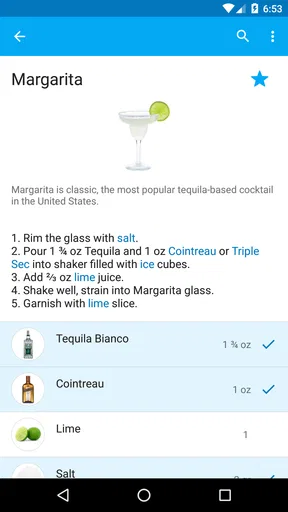
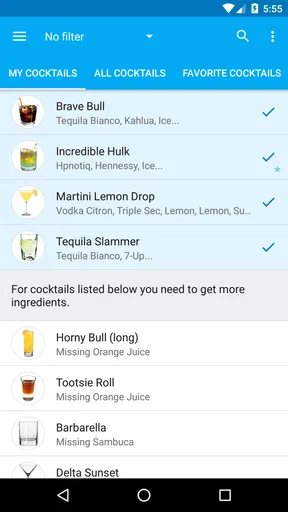
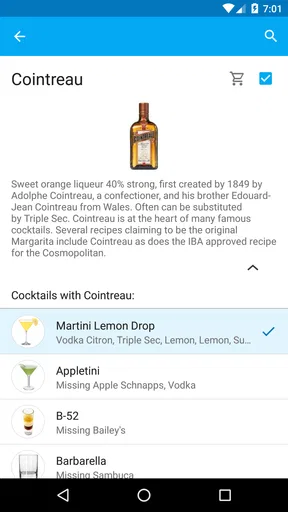
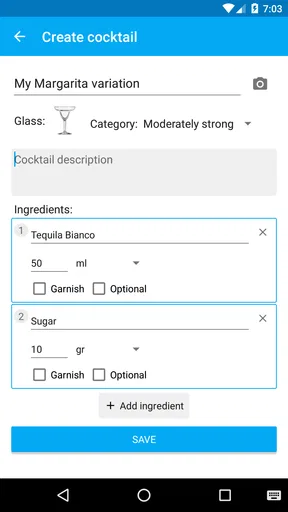
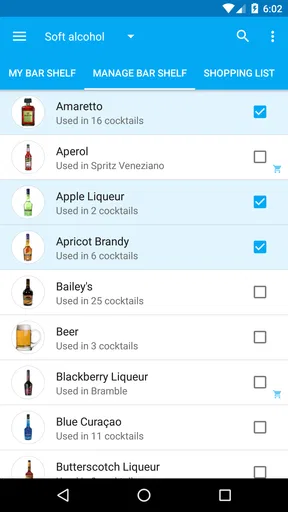
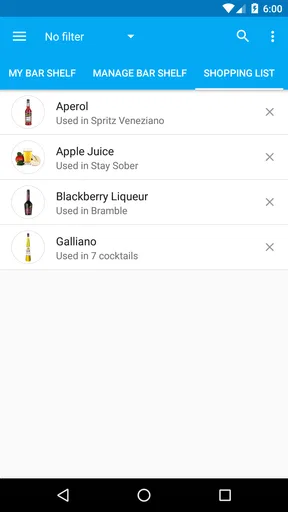
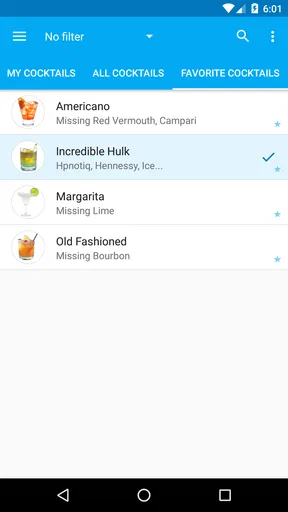
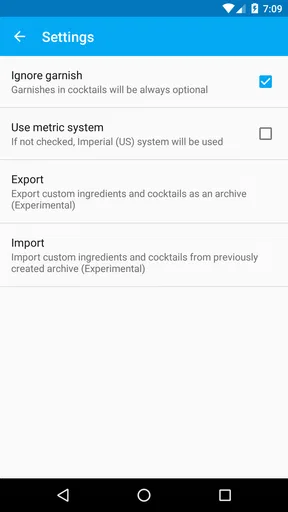
Our Review of My Cocktail Bar Pro
 Analysis by Appyee
I like cocktail apps that help me make a decision quickly rather than turning a simple drink into a research project. My Cocktail Bar Pro takes that practical approach. It is a Food & Drink app from Roman Shu, designed for people who want to prepare cocktails at home and need useful guidance at the moment they are standing in the kitchen, checking bottles, ice, and mixers.
After spending time with it, I see the main appeal clearly: it is more useful as a fast reference than as a full cocktail course. You open it when you want an idea, need to remember a recipe, or are trying to make better use of what is already in your cupboard. That focus makes it approachable, although it also means people looking for extensive education, social features, or a highly visual entertainment experience may want something else.
How the app feels to use in real situations
I find the app most useful when I treat it as a quick recipe reference, not something to browse while juggling bottles and ice. This section looks at how a little preparation can make checking a drink feel calmer and more deliberate. It also sets up the practical question of when that focused approach helps most.
Readable information and straightforward navigation
The strongest part of the experience is the direct relationship between the app and the task. A home bartender usually does not want to browse endlessly while holding a shaker or trying to keep a drink cold. The value here comes from reducing the distance between “What can I make?” and “What do I do next?”
I found that kind of focused design especially helpful when I had a few spirits available but no fixed recipe in mind. Instead of opening several websites, dismissing pop-ups, and comparing conflicting instructions, I could use the app as a single reference point. That does not remove the need for judgment, but it makes the first decision easier.
My Cocktail Bar Pro is also easier to approach than a cocktail book for quick checks. A book can be pleasant when I want to read about ingredients, but it is less convenient when I need to move between a recipe and the counter. An app can keep the information close at hand, which suits short sessions and improvised drinks.
That said, readability depends heavily on the phone being used and the conditions around it. A small screen, dim room, or wet hands can make any recipe app less comfortable. I would not treat it as a hands-free kitchen assistant. It works best when I can pause, look at the screen, and prepare one step at a time.
For someone with limited vision, the practical test is simple: can the text be read comfortably on their own device, and can they navigate without rushing? The app’s usefulness does not automatically guarantee ideal access for every reader. People who need large, high-contrast controls or dependable spoken guidance should test it carefully before relying on it for every drink.
Motor and sensory considerations at the counter
Cocktail preparation already involves several physical actions: opening bottles, measuring liquid, handling ice, shaking, stirring, and cleaning. An app cannot remove those demands, so its best contribution is to keep the information process uncomplicated. In my experience, the less time I spend hunting for instructions, the more attention I can give to the physical parts of the recipe.
This matters for users with limited dexterity. A recipe that can be checked in short glances is more manageable than one that requires repeated scrolling through a long article. I still recommend setting the phone somewhere stable before beginning, because reaching for a device with wet or sticky hands is an avoidable nuisance. A stand or nearby surface can make the experience much safer and less frustrating.
People with sensory sensitivities may also appreciate the app’s practical purpose. It is not an experience I would choose for flashy entertainment; I use it for information. That can be an advantage when visual effects, busy layouts, or constant prompts make other apps tiring. At the same time, anyone sensitive to small text, dense recipe screens, or bright phone displays should adjust the device itself and choose a comfortable environment.
There is a useful distinction between an app being simple and an app being accessible. Simple means I can understand what to do without much explanation. Accessible means people with different abilities can reliably complete the same task. My Cocktail Bar Pro benefits from simplicity, but I would still judge its suitability according to the user’s screen, vision, dexterity, and need for alternative input.
Using it when the situation is less than ideal
The most realistic use case is a small gathering at home. A friend asks for a drink, I have the basic ingredients, and I want to avoid guessing the proportions. I can check the recipe before I start, place the phone beside the preparation area, and work through the drink without turning the evening into a formal lesson. That is where the app feels most natural.
It can also help with planning. Before shopping, I can look through the kinds of drinks I might actually prepare and decide whether a missing mixer or garnish is worth buying. This is better than purchasing a large collection of ingredients without a plan. A useful habit is to choose a small group of recipes that share ingredients, because that reduces waste and gives a home bar more flexibility.
Another good workflow is to use the app before guests arrive rather than during the busiest part of the evening. I can review a recipe, arrange the bottles, prepare ice, and identify any step that may slow me down. This is particularly helpful for anyone who finds multitasking difficult. The app becomes a preparation aid instead of another object competing for attention.
For users with hearing loss, the app’s text-based role may be more comfortable than relying on a video tutorial or spoken instructions. A written recipe can be checked without audio and without needing to follow a presenter’s pace. For users with reading difficulties, however, the opposite may be true: a video, voice assistant, or simplified visual guide could provide a better route than written instructions alone.
Outdoor use is less predictable. On a patio or balcony, glare can affect the screen, and spills are more likely. In a crowded kitchen, other people may block the display or interrupt the process. I would prepare the recipe in advance in those situations. The app is most effective when it supports the environment rather than forcing the environment to revolve around the phone.
What makes it different from the usual alternatives
The usual alternatives fall into three groups: general web searches, cocktail books, and video platforms. A web search offers a huge amount of material, but the quality and format vary. It is easy to lose time comparing recipes, scrolling past introductions, or dealing with pages that are awkward on a phone. My Cocktail Bar Pro is appealing when I want a more contained reference.
A book is better for relaxed learning and background knowledge. I prefer a book when I want to understand a drink’s history, compare techniques, or browse away from the kitchen. The app wins when speed and convenience matter more than atmosphere. Neither replaces the other; they serve different moments.
Videos can be excellent for learning technique, especially for beginners who need to see how to shake, stir, strain, or garnish. They can also be difficult for users who cannot comfortably follow rapid visual movement, hear narration, or keep a screen clean while working. The app’s written format is less demonstrative, but it may be easier to pause and revisit at the user’s own pace.
There is also a trade-off with more modern recipe platforms. Some services emphasize accounts, sharing, recommendations, or constantly updated content. That can be attractive for people who enjoy discovery and community. I see this app as more personal and task-oriented. If I want a quick reference for making drinks at home, that restraint helps. If I want a social cocktail hobby, it may feel limited.
Practical limits I noticed
The price is $1.99, which makes the decision fairly easy for someone who already knows they want a dedicated cocktail reference. It is still not free, so casual users who make a drink only once in a while may prefer a book they already own or a general search. The right question is not whether the cost is large; it is whether the app will be used often enough to justify adding another purchase.
The app has a Mature 17+ content rating. That is important for families and shared devices. A younger person interested in learning non-alcoholic mixing should not assume this is an appropriate children’s app simply because it belongs to the Food & Drink category. Adults should make the decision about whether its subject matter fits their household.
Its current version is 2.8, and the project has been available since February 18, 2012. That long presence suggests a product with a defined identity rather than a brand-new experiment, but it also sets a reasonable expectation: I would not choose it because I expect the pace of a constantly changing social platform. I choose it for a focused reference experience.
Roman Shu is the developer, and the app has reached over ten thousand installs. It also holds a 4.6 average from around eight hundred ratings, with roughly one hundred twenty written reviews. Those figures indicate that many users have found the basic idea worthwhile, although popularity cannot answer the personal questions that matter most, such as text comfort, navigation preferences, or whether the available recipes match someone’s taste.
One limitation is inherent to recipe references: they cannot judge the quality of my ingredients, the size of my ice, or the strength of my pour. A drink can taste different even when I follow the same instructions. Beginners should treat the recipe as a starting point and develop the habit of measuring consistently. Experienced users may appreciate the speed but still need to adapt proportions to their own glassware and preferences.
Who will benefit, and who should choose another tool?
I would recommend it to an adult who wants a compact way to explore home cocktails without committing to a large course or a complicated platform. It suits someone who enjoys making drinks for themselves or friends, likes written references, and values quick access over extensive explanation.
It is also a reasonable choice for a person building a modest home bar. Rather than buying every possible bottle, the user can start with a few familiar ingredients and use the app to decide what is worth adding next. The important trade-off is to shop with a plan: recipes are most useful when they help reduce unused bottles and duplicate mixers, not when they encourage collecting ingredients without a purpose.
I would be more cautious about recommending it to someone who needs strong accessibility support, spoken instructions, very large controls, or a completely hands-free workflow. I would also point beginners toward a visual tutorial or structured cocktail course if their main goal is technique. Likewise, people who want alcohol-free recipes, nutrition information, community discussion, or personalized planning should compare it with tools built specifically around those needs.
For users with different abilities, the best approach is to build a personal setup around the app. Increase the phone’s text size if the interface remains comfortable, use the operating system’s display and accessibility controls, place the device on a stable stand, and review the recipe before handling ingredients. These are small changes, but they reduce reaching, repeated navigation, and visual strain.
An inclusive verdict for home cocktail makers
My Cocktail Bar Pro succeeds because it keeps its purpose clear. I can use it as a practical companion when I want to make a drink at home, check a recipe, or plan around the ingredients I already have. It does not need to be a complete cocktail school to be useful. Its value is in making the reference step quicker and less distracting.
The best reason to choose it is dependable simplicity, not a promise of endless features. That makes it a good fit for adults who prefer written guidance and a focused tool. It is less convincing for users who need rich multimedia teaching, highly customized accessibility, or a social discovery experience.
My final recommendation is positive but specific. If you regularly prepare cocktails and want a dedicated reference on your phone, the modest price is reasonable and the strong user response is encouraging. Before buying, think about how you read on your device and whether a written recipe fits your way of learning. For me, it is most successful as a calm, convenient guide beside the mixing glass—provided I prepare the workspace and do not expect it to solve the physical or sensory challenges of cocktail making itself.
Verdict
Strengths of My Cocktail Bar Pro
- Large cocktail database with classic and modern recipes.
- Ingredient measurements are clear and easy to follow.
- Useful search tools help find drinks quickly.
- Pro version offers a cleaner, ad-free experience.
- Helpful for both beginners and experienced home bartenders.
Limitations of My Cocktail Bar Pro
- Some recipes may require uncommon or expensive ingredients.
- Limited guidance on substitutions when ingredients are unavailable.
- The interface may feel dated on newer devices.
- No built-in shopping list for gathering cocktail ingredients.
- Alcohol-related content may not suit every user or household.
Similar Picks in This Category
View All
Rappi: Food Delivery, Grocery
Rappi, Inc - Delivery3.5

McDonald’s: Cupons e Delivery
Arcos Dorados4.3

Swiggy: Food Instamart Dineout
Swiggy4.7

Blinkit: Groceries & more
Blinkit4.8

foodpanda: food & groceries
Foodpanda GmbH a subsidiary of Delivery Hero SE4.0

Zomato: Food Delivery & Dining
Zomato4.7
Frequently Asked Questions
What is My Cocktail Bar Pro, and who is it designed for?
My Cocktail Bar Pro is a cocktail-focused app designed to help users explore drink recipes, review ingredients, follow preparation instructions, and organize ideas for mixing at home. It can be useful for beginners who need clear guidance as well as more experienced enthusiasts looking for inspiration. Before downloading, remember that the app is intended for adults and should be used responsibly, especially when preparing alcoholic beverages.
Does My Cocktail Bar Pro work without an internet connection?
The app may allow you to access some previously loaded cocktail information while offline, but the exact availability of recipes, images, updates, or other features can depend on the version installed and how the app stores its content. It is best to open the application online after installation so its database can load correctly. Users who plan to use it at parties or while shopping should check offline access in advance.
Does My Cocktail Bar Pro include measurements and step-by-step preparation instructions?
My Cocktail Bar Pro is intended to provide practical cocktail guidance, including ingredient lists, quantities, mixing instructions, and presentation suggestions for supported drinks. However, recipe detail and measurement formats may vary between cocktails and app versions. Users should read each recipe carefully before starting, confirm that they have the correct glassware and tools, and adjust quantities responsibly rather than assuming every drink uses the same preparation method.
Is My Cocktail Bar Pro free to download, or does it contain purchases and advertisements?
The download conditions for My Cocktail Bar Pro can vary depending on whether you use Android or iOS and which version is currently available in the official store. Some features may be free, while advanced content, an ad-free experience, or additional tools could require payment. Check the store listing for the latest information about in-app purchases, subscriptions, advertisements, and refund policies before installing.
Is My Cocktail Bar Pro suitable for people who do not drink alcohol?
The app primarily focuses on cocktails, so many recipes may contain spirits, wine, or other alcoholic ingredients. Nevertheless, users who avoid alcohol may still find inspiration for mocktails if alcohol-free recipes or ingredient substitutions are included. Always review the full recipe before preparing a drink, and remember that some mixers, flavorings, or ready-made ingredients can contain alcohol or allergens despite appearing non-alcoholic.
